
Quick answer: A hotel banquet hall LED display should be planned from the room layout, stage size, table positions, lighting and camera use. Decide whether the screen will stay in one place or change with each event, then ask for a drawing showing the active display area, pixel canvas, mounting and maintenance access. A catalog photo can show an application, but it cannot establish the pixel pitch or cabinet model used at your venue.
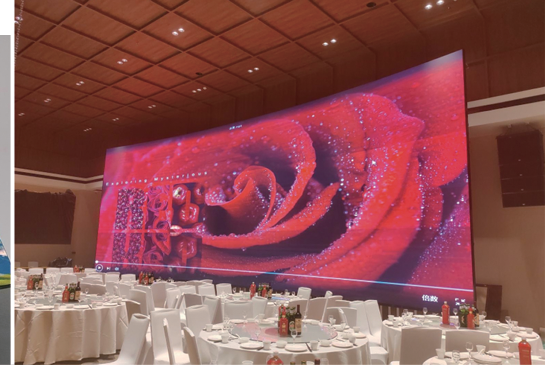
Is this a fixed display or an event screen?
A fixed LED wall can be designed around one stage and a permanent cable route. A hall that frequently changes its stage position, partitions or seating plan may need a different cabinet and mounting approach. Confirm the operating pattern before comparing pixel pitches.
| Hall use | Layout question | Scope to confirm |
|---|---|---|
| Permanent stage backdrop | What are the finished visible width, height and mounting height? | Structure, front or rear service access, power and signal routes. |
| Frequently reconfigured events | Will the screen move, resize or be assembled for each event? | Quoted cabinet series, handling, connection and changeover method. |
| Partitioned hall | Can guests view the display from more than one room arrangement? | Viewing angles, content layout and control for each arrangement. |
Eight checks before choosing a banquet hall LED display
1. Draw the usable stage area
Measure the stage width and height, the ceiling clearance and the position of doors, curtains, speakers and decorative finishes. Mark the area that can actually be occupied by an LED display. The full wall width is not necessarily the usable active display width. Ask for an elevation with cabinet boundaries and the final pixel dimensions.
2. Record seating positions and sightlines
Mark the closest table, the farthest table and any side seating. Check whether guests can see the whole display above people, floral arrangements and stage equipment. Viewing distance helps narrow a pitch discussion, but the room layout and content detail matter too. Review a sample of the proposed LED series at a representative distance.
3. Test the hall lighting
Photograph the stage with the usual banquet lighting and with daylight entering the room, if applicable. Ask to compare the proposed screen at practical brightness settings in those conditions. A catalog brightness range is a reference for its listed cabinet series; it does not prove that a particular image will remain comfortable or legible under every lighting plan.
4. Plan for cameras and live video
Many halls record speeches or send a camera feed to the LED display. State the cameras, frame rates and likely shutter settings before the quote is finalized. The catalog’s refresh figure is useful when shortlisting a cabinet, but test the actual LED display and camera combination for visible scan lines, moiré and color differences. Keep faces and critical text clear of cabinet seams where possible.
5. Define the content canvas
List what the hall will show: event names, presentations, live camera feeds, videos or decorative content. Provide sample files and intended aspect ratios. Ask for the active pixel canvas rather than assuming that a screen described as “wide” will match a standard video format. If the content has to be cropped, decide which areas may be trimmed before the event.
6. Check mounting and maintenance access
Identify the wall or support structure, permitted fixing locations and the space available for technicians. Confirm the quoted cabinet’s maintenance direction and how a module can be replaced after the hall is furnished. Allow for cable access, cleaning and any venue restrictions on working hours. A product table does not substitute for a site-specific installation drawing.
7. Confirm power, signal and control locations
Show the power source, cable routes and the position of the operator or AV rack. If the hall uses multiple room layouts, describe how content sources change between events. The quotation should distinguish the LED display, mounting, control equipment, cabling, installation and content work so that the venue can review the complete scope.
8. Agree an acceptance test
Before handover, view typical content from the nearest and farthest tables and from the main camera position. Check image alignment, text legibility, brightness, sound-system coordination where relevant and service access. Record the agreed screen dimensions, pixel canvas, model and operating instructions in the handover documents.
What does the supplied indoor cabinet table say?
The supplied MVP 2026 Digital Catalog, PDF p. 9, lists these selected indoor full-color cabinet references. Each row has a 640 × 480 mm cabinet. The table lists a 600–800 nit brightness range and 3,840 Hz refresh rate for the series. These are catalog cabinet figures, not specifications for the hotel photograph above.
| Catalog pitch | Listed cabinet size | Listed cabinet pixels |
|---|---|---|
| P1.86 | 640 × 480 mm | 344 × 258 |
| P2 | 640 × 480 mm | 320 × 240 |
| P2.5 | 640 × 480 mm | 256 × 192 |
Source: MVP 2026 Digital Catalog, PDF p. 9, indoor full-color LED display table, supplied as company-group product material. Confirm the current data sheet for the exact proposed cabinet, its operating settings and the finished layout. See the indoor full-color LED display product page for the wider reference table.
What should a hotel send for an initial quotation?
Send a dimensioned stage photo or elevation, room plan with table positions, closest and farthest viewing distances, lighting photos, camera details, example content, power and control locations, destination and installation schedule. State whether the display will be permanent or reconfigured between events. The catalog application examples can help show visual formats, but your hall measurements determine the actual proposal.
Share your banquet hall layout for an LED display quotation review.