
Quick answer: A curved LED wall and an LED column need different site measurements, even when both use flexible LED modules. Record the visible arc or column diameter, display height, viewing positions, fixing surface, service access and cable route before choosing a pixel pitch. A catalog module can bend, but its photograph or module size does not establish the minimum radius or mounting method for your finished display.
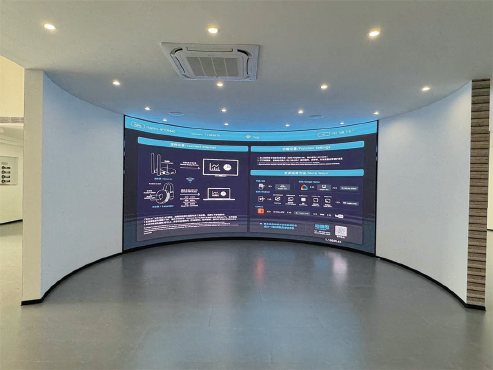
Curved wall or column: what changes in the layout?
| Site shape | First dimension to provide | Early design question |
|---|---|---|
| Concave or convex wall | Visible arc length, radius or a dimensioned plan showing the curve, plus display height | Where do the display edges end, and from which positions should the full image be legible? |
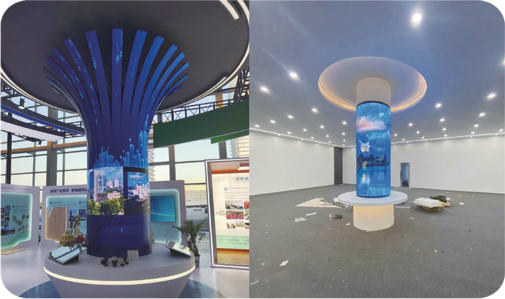
| Round or partial LED column | Column diameter or circumference, intended wrap angle and display height | Is the display a complete wrap or a viewing-side segment, and where can its seam and cables go? |
| Mixed or irregular surface | Measured plan, elevations and photographs of each transition | Which sections can use a repeatable module layout, and which need a separate structure? |
For a simple circular column, circumference is approximately 3.14 times the measured diameter. That calculation is only a starting point: the finished LED display still needs a module layout, edge and seam allowance, mounting details and a confirmed bend limit. Do not round a circumference to a module count and order from that number alone.
What does the supplied flexible-module table actually say?
The Yunwen company-group catalog lists these selected indoor flexible LED module references. All three rows show a 320 × 160 mm module and a 3,840 Hz refresh figure. These are source-table examples, not a promise that every flexible display uses the same module or fits every radius.
| Catalog pitch | Listed module size | Listed module pixels | Listed refresh |
|---|---|---|---|
| P1.25 | 320 × 160 mm | 256 × 128 | 3,840 Hz |
| P1.86 | 320 × 160 mm | 172 × 86 | 3,840 Hz |
| P2 | 320 × 160 mm | 160 × 80 | 3,840 Hz |
Source: Yunwen product catalog (云纹宣传画册 3.0), PDF p. 5, supplied as company-group product material. The same page also lists multiple P2.5 entries with different refresh and module configurations. It does not state a minimum radius for these rows. Confirm the current model sheet, bend direction and allowable radius, control configuration and installed layout before specifying a project. See the flexible and custom-shaped LED display product page for the wider catalog table and source boundary.
Seven measurements to send before requesting a quote
1. Draw the actual curve or column
For a curved wall, send a dimensioned plan or a measured radius, the display’s intended start and end points, and its visible height. For a column, send the diameter at the display position, height and intended wrap angle. Include an elevation and photographs with a scale reference. A photograph by itself can hide changes in radius or an out-of-round column.
2. Mark the main viewing positions
Show where visitors normally stand, the closest viewing distance and the directions from which they approach. A concave wall may be viewed mainly from its center; a column can be approached from several sides. These positions affect the useful display area, content layout and pixel-pitch discussion. Ask to review content at the proposed size from the actual viewing zones.
3. Check what can support the display
Identify the wall or column construction, available fixing points and any surfaces that cannot be drilled. Ask for a dimensioned mounting drawing for the selected LED display. A flexible module does not remove the need for a suitable supporting structure, and its own flexibility does not prove that every adjacent cabinet, corner or fixing can bend.
4. Locate seams, edges and obstructions
Mark doors, corners, handrails, vents, sprinklers, signage and finish joints. On a column, decide where a visible seam is acceptable and whether a full wrap is necessary. On a wall, decide how the display will terminate at both ends. Ask for a module layout and the finished active pixel dimensions before artwork is produced.
5. Plan service access
Record the clearance in front of and behind the proposed LED display, and whether lifts or maintenance staff can reach its upper sections. The source catalog describes front maintenance as a product feature, but the actual service method still depends on the quoted model and surrounding structure. Confirm module replacement access on the installation drawing.
6. Plan power, signal and content
Share the power location, cable route, control position and intended content sources. Curved surfaces and columns may split an image across different viewing directions; identify important text and focal points before defining the playback canvas. Ask for a pixel map and a sample content preview based on the proposed module layout.
7. Confirm the exact series and scope
The written quote should identify the proposed flexible module, pitch, quantity, mounting structure, visible screen dimensions, pixel canvas, service method and accessories. Request a current, model-matched data sheet including the permitted bend direction and radius. The catalog photographs below are application references; they do not establish the model used at another venue.
Common buyer questions
Can any flexible LED module wrap around a 1 m column?
Not from pitch or module size alone. Give the actual diameter and wrap angle, then check the proposed model’s permitted radius, bend direction, module layout, support and service access. The reviewed source table does not provide a minimum-radius value.
Does a smaller pixel pitch automatically suit a curved display better?
No single pitch follows from the curve alone. Discuss viewing distance, content detail, screen dimensions, camera use if relevant and the available model options together. Compare a sample from the exact series being quoted instead of treating a catalog pitch as a finished design.
What should I attach to the first inquiry?
Send a plan or measured diameter/radius, display height, photographs, main viewer positions, mounting restrictions, power location, content examples, destination and schedule. The catalog project examples show other shapes, but their captions should not replace a drawing for your site.
Share your curved-wall or column dimensions for an LED display review.